Twin Space Dual Ship Arcade
Reviews
💡Twin Space offers a unique twist on the endless arcade genre by requiring players to control two ships at once. The mirrored controls are easy to learn but hard to master, providing a satisfying challenge. The increasing speed keeps each round exciting, and the simple bonus collection adds a layer of strategy. It's a great choice for quick gaming sessions on any device.
Description
Game Introduction
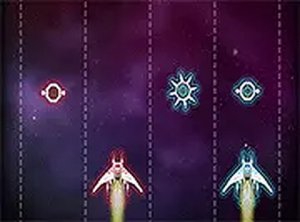
Twin Space is an arcade game that challenges players to control two spaceships simultaneously in an endless cosmic environment. The core objective is to navigate both ships away from incoming obstacles while collecting glowing bonuses that appear on the screen. This game stands out by requiring players to manage two ships at once, a red ship and a blue ship, which move together in a mirrored fashion. The action is continuous, with the pace increasing over time, testing your ability to focus and react quickly. Designed for quick sessions, Twin Space runs directly in a web browser on both mobile and desktop devices, requiring no downloads. The family-friendly theme and straightforward mechanics make it accessible to players of all ages who enjoy fast-paced coordination challenges.
How to Play
Players control both ships by moving a single point on the screen, typically using a mouse or touch input. The red ship follows the cursor or finger, while the blue ship mirrors its movements. The goal is to steer both ships away from obstacles and collect all available bonuses. Each bonus adds to the score, and the game becomes faster as you progress. The controls are designed to be responsive and intuitive, allowing players to focus on coordination rather than complex commands. Success depends on keeping both ships safe from collisions while gathering as many bonuses as possible.
Game Features
Endless arcade action that increases in speed over time. Dual-ship control system that challenges hand-eye coordination. Obstacle avoidance keeps each round unique. Bonus collection system adds to the player's score. Cross-device compatibility allows play on mobile and desktop browsers without downloads. Simple controls make it easy to start playing immediately.
Tips for Success
To improve in Twin Space, practice keeping both ships centered on the screen to better monitor obstacles. Prioritize collecting bonuses, but always watch both ships to avoid collisions. As the game speeds up, try to anticipate obstacle patterns rather than reacting at the last moment. Regular short practice sessions can help build reflexes and multitasking abilities. Staying calm and maintaining a steady rhythm will help you survive longer.