Dockyard Parking Puzzle
Reviews
💡Dockyard Car Parking Simulator Game delivers a solid parking experience with 45 levels that gradually increase in difficulty. The controls are responsive, and the ability to upgrade cars adds replay value. Each level requires careful planning, making it a good brain teaser for players who enjoy precision tasks. The game is family-friendly and runs well on desktop browsers. It is a satisfying choice for short breaks or longer play sessions.
Description
Game Introduction
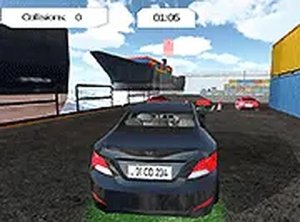
Dockyard Car Parking Simulator Game - Driving Puzzle is a browser-based driving puzzle that challenges players to park a car in a realistic dockyard environment. The core objective is to navigate through tight spaces and avoid obstacles such as cones and barriers to reach the designated parking spot. This game combines driving skill with puzzle-solving, offering a calm yet engaging experience that tests precision and patience. It is designed for desktop browsers and is free to play, making it accessible to anyone looking for a thoughtful driving challenge.
How to Play
Players control their vehicle using keyboard inputs, typically arrow keys or WASD for steering and movement, with a brake function to stop the car. Each level presents a unique parking scenario, such as maneuvering through narrow docks or around obstacles. The goal is to park the car in the marked spot without hitting any objects. Players can use camera angles to better judge distances and plan their moves. As levels progress, the challenges become more complex, requiring careful planning and precise control.
Game Features
The game includes a series of levels that gradually increase in difficulty, from simple straight parking to complex maneuvers in confined spaces. Players can choose between two cars and upgrade them to improve handling and speed. A full screen mode provides an immersive experience. The game is designed for desktop browsers, ensuring smooth performance. As a free-to-play title, it offers a complete parking simulation without any cost.
Tips for Success
Take your time to study each parking scenario before moving. Use the available camera angles to get a better view of your surroundings. Practice braking smoothly to avoid overshooting the parking spot. Plan your approach in advance, especially in narrow spaces. Regular practice will help you master the controls and improve your precision. Remember that patience is key—rushing often leads to mistakes.