City Racing 2 Player
Reviews
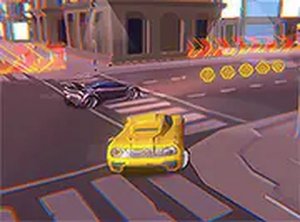
💡2 Player City Racing Online Game delivers straightforward arcade racing with a focus on two-player competition. The split-screen view is clear and fair, and the city tracks offer enough variety to keep races interesting. Controls are easy to learn, making it accessible for players of all ages. The game runs smoothly in a browser without any downloads. It is a reliable choice for short, fun sessions with a friend, offering good replay value through its head-to-head format.
Description
Game Introduction
2 Player City Racing Online Arcade Game is a head-to-head racing game designed for two players on the same computer. The core objective is to race through city streets, dodge traffic, and cross the finish line before your opponent. What makes it unique is its split-screen view, giving each racer a fair and clear perspective. It is family-friendly, non-violent, and focuses on skill and friendly rivalry. No installation is required, so you can start playing instantly in your browser.
How to Play
To play, you and a friend sit together at the same computer. Player 1 uses the arrow keys to steer, accelerate, and brake. Player 2 uses the W, A, S, D keys. The goal is to race through city courses, avoid obstacles, and cross the finish line before your opponent. You can also practice against the computer in single-player mode. For a better view, click the full screen button on the game interface. The controls are responsive and easy to learn, making the game accessible for all skill levels. Stay on the track and avoid collisions to maintain speed.
Game Features
The game features split-screen multiplayer for fair competition. City racing tracks provide varied environments. Keyboard controls are simple and responsive. Full screen mode is available for an immersive experience. The game is free to play in your browser with no downloads or sign-ups. It is designed for quick, competitive fun without complicated setups, perfect for short gaming sessions with friends or family.
Tips for Success
Practice your driving lines to take corners smoothly and maintain speed. Keep an eye on your opponent's position using the split-screen view. Avoid unnecessary collisions with traffic or obstacles, as they can slow you down. Use the full screen mode to get a better view of the track. If you are new, try single-player mode first to learn the controls and track layouts. Stay focused and anticipate upcoming turns to gain an edge.