

Void Defense Tower Strategy
Runs in your browser — no download.
Reviews
Void Defense Tower Strategy offers a polished tower defense experience with a science fiction theme. The isometric view and mouse-only controls make it easy to pick up. The gradual tech upgrades and 50 waves provide steady challenge without being overwhelming. It is ideal for players who enjoy strategic planning in short bursts.
Description
Game Introduction
Void Defense Tower Strategy is a strategy game set in a science fiction universe. Your core objective is to protect your base from waves of incoming opponents by strategically placing defensive towers. The game emphasizes gradual progression and resource management, allowing you to upgrade your technology and unlock new skills as you advance. Designed for quick sessions, it offers a clean, family-friendly experience that is accessible to players of all ages.
How to Play
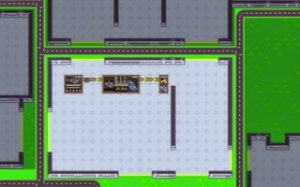
Players use only the mouse to interact with the game. You can left-click to select and place defensive towers on the isometric map. The scrollwheel allows you to zoom in and out for a better view of the playing field. Start by placing initial defenses to earn resources, then upgrade existing towers and unlock new abilities to counter stronger opponents. Pay attention to opponent movement patterns and adjust your strategy accordingly. The simple controls make the game easy to learn for all skill levels.
Game Features
The game includes a progression system with tech upgrades that improve your defenses over time. You can unlock new skills to handle different opponent types. With 50 waves of opponents, each wave introduces new patterns and challenges, keeping the gameplay fresh. The isometric perspective provides a clear view of the playing field. The game is designed for quick play sessions, typically lasting around 5 minutes, making it ideal for short breaks.
Tips for Success
Start by placing a few basic defenses to build up your resources early. Observe opponent movement patterns to identify the most effective locations for your towers. Prioritize upgrading existing towers before adding new ones, as stronger defenses can handle tougher foes. Unlock and experiment with different skills to find the best counters for each wave type. Manage your resources wisely, balancing between new placements and upgrades. Practice regularly to improve your strategic timing and placement.






03 Comments
Sign in to comment
You must be logged in before posting a review or rating.
No account? Create one
No comments yet. Be the first to comment!