Game Dot Exe Arcade Action
Reviews
💡Game Dot Exe is a well-designed action arcade game that focuses on core gameplay without unnecessary complexity. The controls are responsive, and the increasing difficulty provides good replayability. It is a safe and engaging choice for players of all ages, perfect for short breaks or longer play sessions. The simple visual style matches the digital theme well.
Description
Game Introduction
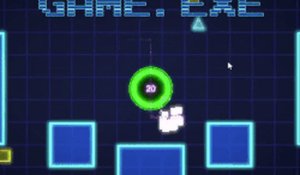
Game Dot Exe is an online action arcade game set in a digital world. Your core objective is to protect your kernel from hostile objects by running over them to erase them. The game is designed to be family-friendly and safe for all ages, offering a fun challenge without violence or inappropriate content. Its fast-paced, quick-session format makes it ideal for short breaks, while the retro-inspired visuals and good music enhance the arcade experience. With a top-down perspective and minimalist design, the game focuses on pure action and reflex-based gameplay.
How to Play
Players navigate a simple arena using keyboard controls (typically WASD keys) to move their character. Alternatively, mouse control can be activated for movement. The objective is to run over hostile objects that appear on screen to erase them before they reach your kernel. The game starts easy but increases in difficulty as more enemies appear and move faster. The controls are straightforward, allowing anyone to pick up and play, but mastering the game requires practice and quick reflexes. Staying alert and moving strategically are key to success.
Game Features
Fast-paced gameplay that keeps you engaged. Family-friendly design with no violence or inappropriate content. Easy-to-learn controls using keyboard or mouse. Increasing difficulty that challenges players of all skill levels. Perfect for short gaming sessions (5-minute bursts). Clean, minimalist visual style with a retro digital theme. Good music that complements the action. Top-down perspective for clear arena view. Incremental progression as difficulty ramps up.
Tips for Success
Practice regularly to improve your reflexes and movement precision. Learn the patterns of enemy spawns and movement to anticipate threats. Prioritize enemies that are closest to your kernel to minimize risk. Use quick, controlled movements rather than frantic dashes. Take advantage of short sessions to stay focused and avoid fatigue. Experiment with both keyboard and mouse controls to find which feels more comfortable for you. Stay calm under pressure as the difficulty increases.