
Critter Shield Run
Runs in your browser — no download.
Reviews
Critter Shield Run strips away unnecessary complexity to deliver a pure test of hand-eye coordination. The shield moves exactly as you direct it, and the objects arrive with enough variety to stay interesting. I appreciate how the visual style remains friendly without feeling childish, making it suitable for all ages. The lack of intrusive ads or paywalls is a welcome change from many free browser games. If you enjoy games that reward focus and quick adjustments, this one offers solid value for short play sessions.
Description
Core Gameplay Loop
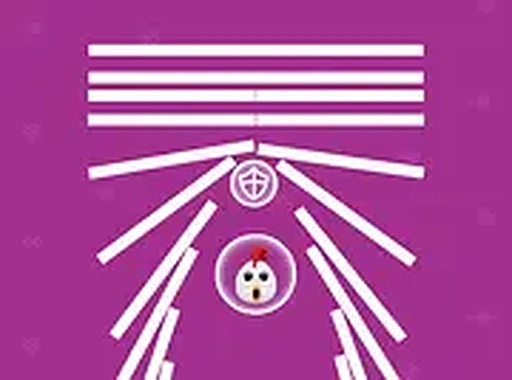
In Critter Shield Run, your main task involves moving a protective ring around the screen to block objects that drift toward a stationary animal character. Each round tests your ability to predict where threats will arrive next. The animal stays in place, so all your attention goes toward positioning the shield correctly. Success depends on reading the speed and angle of incoming items, then shifting the barrier in time. There are no complex menus or power-ups to manage, which keeps the focus squarely on your reaction time and spatial awareness.
Visual Style & Atmosphere
The game presents a bright, cheerful world with a hand-drawn animal at its center. Soft colors and simple shapes create a calm setting that does not distract from the action. The animal’s gentle expressions change slightly as you play, adding a small emotional reward for keeping it safe. Background elements remain minimal, so your eyes stay on the shield and the approaching objects. This clean design makes the game accessible for younger players while still offering enough visual charm to hold an adult’s interest during short sessions.
Difficulty Curve
Critter Shield Run begins at a relaxed pace, giving you time to learn how the shield moves and how objects behave. After a few successful blocks, the frequency and variety of incoming items increase. Some objects travel in straight lines, while others follow curved paths. Later rounds introduce faster speeds and tighter clusters, forcing you to plan several moves ahead. The difficulty ramps up steadily without sudden spikes, so you always feel like you have a fair chance to improve. This gradual increase keeps the game from becoming boring or frustrating.
Control Options & Accessibility
You can play using either a mouse or keyboard. With a mouse, simply drag or move the cursor to slide the shield around the screen. Keyboard users can press the arrow keys or WASD to shift the barrier in four directions. Both methods respond instantly, so you can choose whichever feels more natural. The game runs in any modern web browser without requiring a download or plugin. A full-screen mode is available for those who want a more immersive view. These options ensure that almost anyone can pick up the game and start playing immediately.
Session Length & Replay Value
Each attempt in Critter Shield Run lasts as long as you can keep the animal safe. Early tries may end after a minute or two, but with practice you can extend sessions significantly. Because the object patterns change each time, no two rounds feel exactly alike. This variety encourages repeated plays to see how far you can go. The game does not save progress or track high scores across sessions, so each playthrough is a fresh start. This design works well for quick breaks or for longer sessions when you want to focus on beating your personal best.




03 Comments
Sign in to comment
You must be logged in before posting a review or rating.
No account? Create one
No comments yet. Be the first to comment!