
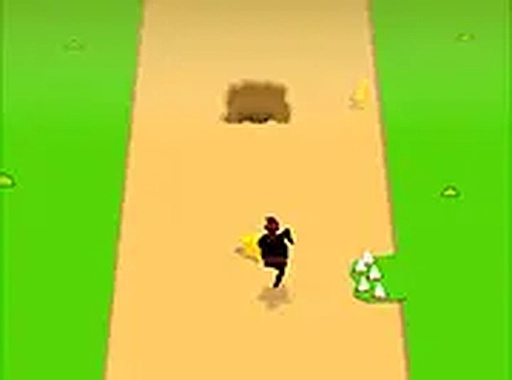
Swift Runner: Endless Arcade Dash
Runs in your browser — no download.
Reviews
Swift Runner offers a classic endless runner experience with responsive one-tap controls. The increasing speed keeps the gameplay engaging, while star collection adds a scoring challenge. It is perfect for quick sessions on any device, and the no-download feature makes it instantly accessible. A great choice for casual gamers.
Description
Game Introduction
Swift Runner: Endless Arcade Dash is a fast-paced endless runner game where players guide a nimble character on a mission to collect stars while avoiding obstacles. The path is filled with gaps and sharp hazards that must be dodged to keep moving forward. With simple controls and quick action, this game offers endless fun for players of all ages. Whether you are a casual gamer or a seasoned player, Swift Runner challenges your reflexes and timing. The colorful graphics and smooth gameplay make it a joy to play on both desktop and mobile devices. Best of all, there is no download required—just open your browser and start playing instantly.
How to Play
To play Swift Runner, you guide the character as they run automatically. Your goal is to jump over gaps and avoid hazards by tapping or pressing a key at the right moment. Collect as many stars as you can to increase your score. The game gets faster and more challenging as you progress, so stay alert. There are no complicated rules—just jump, dodge, and collect. If you hit a gap or a hazard, the game ends, so focus on timing your jumps perfectly. Practice makes perfect, and soon you will master the art of swift running.
Game Features
Swift Runner features simple one-tap controls that are easy to learn. It offers endless runner action with increasing difficulty to keep you engaged. Star collection boosts your score, and obstacle avoidance tests your timing. The game is mobile-friendly, allowing you to play anywhere, and requires no download—just play instantly in your browser. Full screen mode provides an immersive experience. The classic arcade style and swift character theme add to the fun, making it a great choice for quick gaming sessions.
Tips for Success
To succeed in Swift Runner, focus on timing your jumps precisely. As the game speeds up, anticipate obstacles by watching the path ahead. Collect stars whenever possible to maximize your score, but don't risk a jump if it means hitting a hazard. Practice regularly to improve your reflexes and learn the rhythm of the game. Staying calm and maintaining a steady pace will help you run farther and achieve higher scores.





03 Comments
Sign in to comment
You must be logged in before posting a review or rating.
No account? Create one
No comments yet. Be the first to comment!